

The Powerful Orchestration Engine for Seamless VoiceBot Creation.
BotCompose by Epicode transforms customer engagement by replacing traditional IVR systems with intelligent VoiceBots, enabling natural, seamless conversations. It integrates effortlessly with existing PBX, UC, and CRM platforms, empowering businesses to create tailored, domain-specific voice applications with advanced speech technologies.
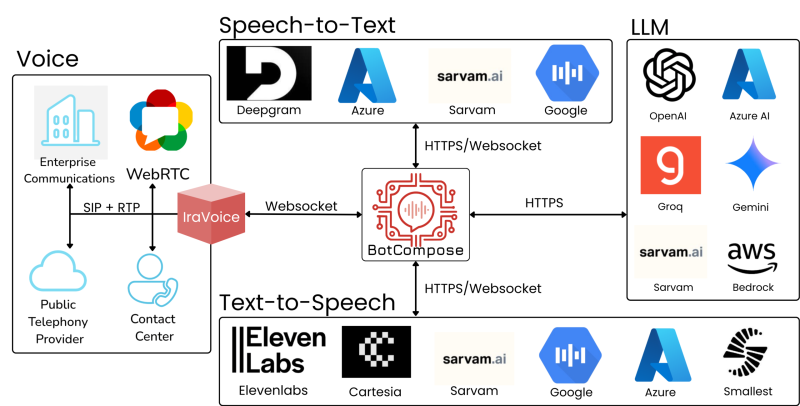
With a best-of-breed approach to TTS, STT, LLM and NLP modules, BotCompose ensures top-tier performance and flexibility. It supports integration with both established AI models and custom inference endpoints, while built-in content moderation and BotStream integration provide secure, compliant, and scalable voice solutions.
Use Cases
- Real time Agent Assist
- Real Time Translation
Load Testing Suite
- BotCompose - FAQs
Create Voicebots On the Go
Create and manage voicebots via APIs, with intelligent TTS caching for faster responses and lower synthesis costs.
AI-ready voice integration with PSTN, PBX, UC, and
CRM—optimized STT/TTS, flexible NLP, and built-in compliance
Seamless Connectivity
PSTN Integration with any Telco, existing PBX, UC systems and Secure WebRTC.
Best-of-Breed Approach
Choose from highly curated list of top industry AI models including STT, TTS, SLM, LLM, and NLP.
High Availability and Scalability
Delivers a unified, secure, and highly resilient architecture, ensuring unparalleled scalability across all components.
Compliance, Trust, and Brand Safety
Flags 14 critical risk categories: from violent and non-violent crimes to hate speech, child exploitation, and privacy breaches.
Handover to Human Agent
Kubernetes-native scaling to handle fluctuating traffic loads.
Intelligent Efficiency
Native BotStream integration with advanced Voice Activity Detection(VAD) for accurate speech start and end detection.
Elevate Agent Assist
Integrate seamlessly for agent assist, silently monitoring calls via IraTap and BotStream during live customer-agent conversations.
Seamless, Near-Real-Time Translation
Seamlessly translates between customer and agent languages, enabling smooth, real-time communication across any language barrier.
Configurable TTS Caching
Enable TTS response cachingto reduce latency, optimize TTS usage, and lower costs for high-frequency voice prompts.
BotCompose
FAQs
What are the built-in plugins available in BotCompose?
STT Plugins
- azure_fast
- azure_real_time
- deepgram
- deepgram_streaming
- google_streaming
- sarvam
LLM Plugins
- openai_like
TTS Plugins
- azure
- cartesia
- elevenlabs
- openai
- sarvam
- smallestai
How do I choose the right STT, TTS, and LLM models? Which ones offer the best performance?
Choosing the right models depends on your use case, language needs, latency, compliance, and cost.
Key Considerations:
- STT: Prioritize accuracy and noise handling (e.g., Google STT, Sarvam AI).
- TTS: Focus on natural voice quality and expressiveness (e.g., ElevenLabs).
- LLM: Look for reasoning quality, safety, and speed (e.g., GPT-4, Groq + LLaMA).
Does BotCompose support creating voicebots that handle multiple languages?
Yes. BotCompose allows you to configure voicebots to support one or more languages, subject only to the language capabilities of the underlying AI models being used.
Which STT plugins support streaming?
Currently, BotCompose supports the following plugins for streaming STT:
deepgram_streaminggoogle_streaming
How to enable streaming STT?
Requirements for Streaming STT Setup
To enable streaming STT, both of the following configurations are required:
While configuring the bot, set
stt_config.plugin_nameto either:deepgram_streaminggoogle_streaming
In the
make_callpayload, set the following withincall_params:"streaming_useraudio": true
Both configurations are mandatory for streaming STT to function correctly.
Can plugin configurations be changed during a live call?
Yes. BotCompose supports runtime plugin reconfiguration through built-in tools.
For example:
- Switch STT language dynamically
- Change TTS voice/model mid-conversation
A common use case is multilingual bots that detect language and switch STT/TTS configurations in real time.
How does BotCompose handle observability and analytics?
Every call generates a detailed CDR (Call Detail Record) JSON containing:
- Call metadata
- Full transcript
- Tool invocation history
- Latency metrics (STT / LLM / TTS)
- Usage metrics (tokens, duration, cache savings)
CDRs can be automatically pushed to partner systems for downstream processing.
What is TTS caching in BotCompose?
TTS caching in BotCompose is a built-in feature that lets you preconfigure voicebot responses for the bot to use during conversations, reducing response latency and lowering overall TTS costs.
How does TTS caching work?
BotCompose supports TTS caching to reduce latency and repeated provider calls.
- Add reusable phrases while creating a bot
- When the LLM generates the same sentence, BotCompose serves audio from cache instead of requesting fresh synthesis from TTS.
- This improves response speed and lowers TTS costs.
How do I enable TTS cache?
Define the phrases to be cached within tts_cache_config.sentence_list.
Example:
{
  "sentence": "Thank you for your valuable feedback and time.",
  "trim_silence": true
}
What is trim_silence?
trim_silence removes leading and trailing silence from the generated audio before storing it in the cache.
How do I get the call CDR?
Pass transcript_url within the call parameters. Once the call is completed, BotCompose will push the CDR as a JSON payload to the specified endpoint. The CDR includes the transcript, tool calls, call timings, and other call metadata.
How do I access agent logs?
Agent logs are available only in production environments.They are not exposed in sandbox setups.